

What Happens When You Feed NotebookLM Your Entire Marketing Knowledge Base
Upload your sales calls, reviews, and market research, and turn them into messaging, insights, and strategy in minutes.

If you’ve been reading this newsletter (or following on LinkedIn) for a while, you know I’m pretty bullish on two AI companies right now: Anthropic and Google.
Claude is getting a TON of the love in AI circles right now, and for good reason. But Google is still releasing a lot of great AI tools. I’ve highlighted many on newsletters in the past, but one that we’re going to revisit today is NotebookLM. Because over the past year it’s quietly evolved into one of the most practical AI products for marketers.
So this week, instead of a video walkthrough, I’m doing another long-form deep dive on how B2B marketing teams can turn NotebookLM into a real GTM workflow tool.
This week’s Stack
1 deep dive: How to turn NotebookLM into your marketing team’s research brain
1 prompt: Move your AI memory from ChatGPT to Claude
1 tool: A new AI interface experimenting with persistent memory
3 resources: Prompting tactics, AI workflows, and AI-native thinking
3 jobs: AI growth, enablement, and operations roles
Let’s dive in.
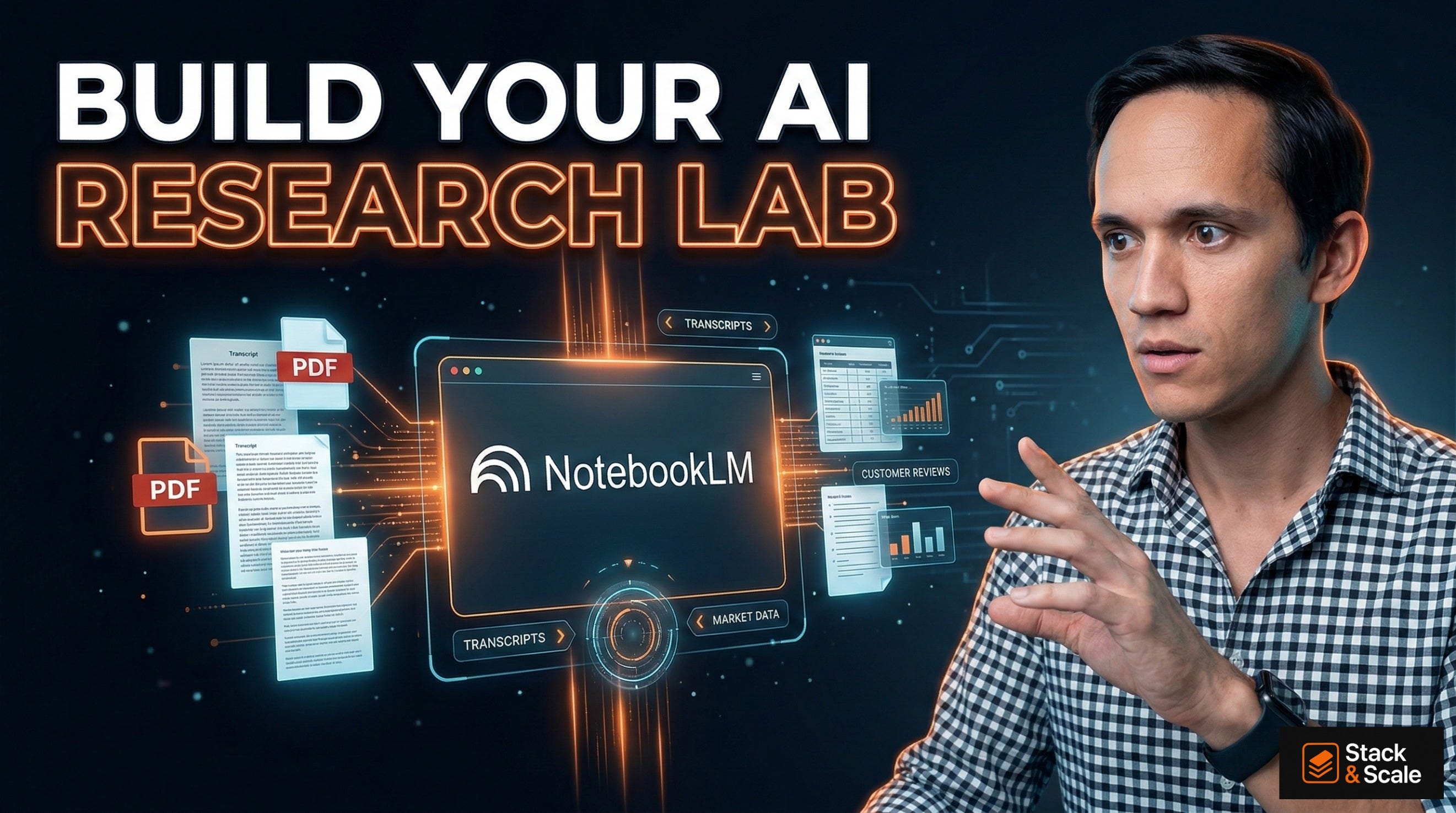
The Marketing Brain You Never Built:
Why NotebookLM Should Be Your Next GTM Workflow Tool
If you’ve been following me, you know I am a fan of NotebookLM. I wrote about it in an earlier newsletter, but they’ve made some major upgrades in the last six months. I thought it was time to do a deeper dive on how marketers can use it.
If you’re not familiar with it, NotebookLM is an AI-powered research and note-taking tool from Google. They position it a “thinking partner,” allowing you to ground AI responses in your own uploaded documents. It analyzes PDFs, Google Docs, YouTube videos, websites, and text to generate summaries, study guides, outlines, and podcast-style audio discussions
Most AI tools give you a smart assistant with a large general knowledge base. But NotebookLM works differently. Instead of relying on general training data, it grounds every response in the sources you upload. PDFs, Google Docs, URLs, YouTube transcripts, audio files, Microsoft Word documents. You feed it your documents, and it becomes an expert in exactly that corpus., nothing else.When you ask NotebookLM a question, it reasons across your uploaded materials and cites specific passages to back every claim.
What’s Changed: NotebookLM’s Most Important Recent Updates
If your mental model of NotebookLM is the early version from 2023 (upload a PDF, ask questions, get answers) you’re working with an outdated map. The product has evolved significantly. Here are the updates that matter most for marketing professionals.
1. Audio Overviews (and Interactive Audio)
The feature that went viral. Upload a collection of documents and NotebookLM generates a podcast-style conversation between two AI hosts who discuss, debate, and synthesize your content. For long research documents or dense competitor analyses, this turns reading work into commute-time listening.
More recently, the team added the ability to join the conversation, interrupting the hosts, asking follow-up questions, and steering the discussion. New Audio Overview formats now include a brief summary, a critique, and a debate format, giving marketers multiple angles on the same material.
I still use this feature ALL the time.
2. Video Overviews and Slide Deck Generation
NotebookLM can now convert your uploaded sources into slide decks and video overviews, where the AI hosts discuss your material while presenting relevant visual content. If you need to communicate research to executives or internal teams, this reduces hours of deck-building into minutes.
It’s still not perfect, but this has improved now that it uses Nano Banana Pro to create presentation, and I can only image that it will continue to improve.
3. The Studio Panel
A redesigned three-panel interface separates your workflow into Sources (manage uploads), Chat (I think of it as interrogating your knowledge base), and Studio (generate outputs). From Studio, you can click one button to produce a briefing document, study guide, FAQ, timeline, or audio overview from your uploaded sources. I think this is where NotebookLM becomes a real tool to production tool.
4. Data Tables
One of the most practically useful recent additions is the ability to ask NotebookLM to synthesize information from your sources into structured tables, exportable to Google Sheets. Ask it to extract every competitor’s pricing from a collection of competitive research documents. Ask it to pull all customer objections from a set of sales call transcripts and categorize them by theme. The output drops directly into a spreadsheet, ready for analysis. From here, I’ll often use Gemini to help me figure out the best way to do the analysis. I’ll sometimes use the Claude Chrome Plugin to do some of the data cleaning, formatting, etc.
5. Expanded Context Window and Conversation Memory
NotebookLM now runs on Gemini’s full 1 million token context window, which is amazon! This is significant jump that allows it to reason coherently across very large document collections. Conversation memory has also increased more than sixfold, meaning you can have extended, multi-turn research sessions without the model losing track of earlier context.
6. Custom Personas and Goal-Setting
You can now configure NotebookLM with detailed custom personas (up to 10,000 characters) defining tone, role, output format, constraints, and reasoning style. So, depending on the task you can set it up as a B2B positioning analyst, a competitive intelligence researcher, a demand generation strategist, etc. The model then applies that lens to every response across your notebook.
7. Collaboration and Workspace Integration
NotebookLM is now a core Google Workspace service available to business customers, including enterprise-grade data protection where your uploads and queries are never used to train models. The source types now include Microsoft Word files, Google Sheets, YouTube URLs, and images, which really broadening the range of B2B marketing materials you can load in.
Ok, now for the fun stuff!
Setting Up Your Marketing Brain
The biggest mistake marketers make with NotebookLM is treating each notebook as a one-off research project. The better approach is building structured, persistent notebooks that accumulate context over time, effectively creating a knowledge base that reasons.
Here are three core notebook architectures worth building from day one.
ICP & Audience Insights
What to Upload: Win/loss interviews, sales call transcripts, G2 reviews, survey results, support tickets
Primary Use: Messaging development, positioning, persona refinement
Sales Enablement
What to Upload: Product docs, pitch decks, battlecards, competitor websites (as PDFs), case studies
Primary Use: Objection handling, rep training, deal support, competitive responses
Market Intelligence
What to Upload: Analyst reports, competitor announcements, earnings transcripts, industry news summaries
Primary Use: Trend spotting, demand signals, narrative shifts, board-level insights
Use Case 1: Audience Insight Mining
Turn raw customer conversations into positioning fuel in a single afternoon
Most marketing teams collect far more customer intelligence than they actually use. Sales calls sit in Gong. Win/loss interviews live in a shared folder (and let’s be honest, nobody opens it). G2 reviews get glanced at once per quarter. Support tickets get routed to the product team and disappear, neven to be seen by marketing.
The information is there, no one ties it together and turns it into useful, actionable insights.
But NotebookLM can that scattered intelligence into a working research layer you can examine in real time.
Sources to Upload
Gong/Fathom/Granola call transcripts (exported as PDFs or text)
Win/loss interview recordings or written summaries
NPS or CSAT survey open-ended responses (compile into a single document)
G2, Capterra, or Trustpilot reviews (export or copy into a text file)
Customer support ticket summaries by theme
Exit survey responses
Sales team objection logs
Workflow Steps
Create a dedicated notebook: ‘ICP Intelligence: [Quarter]’
Upload 10–20 sales call transcripts from deals you’ve won, deals you’ve lost, and churned accounts
Add 3–5 win/loss interview summaries
Paste compiled G2 and Capterra review excerpts (100–200 reviews minimum for useful patterns)
Set a custom persona: ‘You are a B2B positioning strategist. Analyze these sources to identify buying triggers, objection patterns, language customers use to describe their pain, and competitive comparison themes. Always cite your sources.’
Run the queries below. Use the Data Tables feature to export structured findings.
Analysis Queries to Run
‘What are the five most common reasons customers chose us over competitors? Quote specific language from the transcripts.’
‘What objections appear most frequently across lost deals? Group them by theme and show frequency.’
‘What words and phrases do customers use to describe the problem we solve before they knew our product existed?’
‘Where do customers express the most frustration in the pre-purchase experience? What are they most skeptical about?’
‘Compare the language used by ICP-fit customers versus out-of-profile customers. What distinguishes them?’
Outputs and What to Do With Them
A single afternoon in this notebook can surface:
The exact trigger phrases that precede a purchase decision (gold for paid and email copy)
The top three objections your messaging needs to proactively address
Customer-native language to replace the jargon in your homepage and sales decks
Patterns in which personas convert fastest and which require the most education
Use the Audio Overview feature to generate a podcast-style debrief for your sales team or leadership. It’s a surprisingly effective way to distribute customer intelligence to people who won’t read a 20-page research summary.
Sample Output: Customer Voice Analysis
Most frequent pre-purchase trigger: ‘We just lost a deal we should have won’ (appears in 11 of 18 win transcripts)
Top objection in lost deals: ‘We’re not sure this integrates with [existing stack]’ — cited in 14 of 22 loss transcripts
Customer-native language for pain: ‘Visibility gap’ / ‘blind spot’ / ‘flying without data’ — avoid ‘unified analytics platform’
ICP signal: Buyers who reference ‘board visibility’ in first call convert at 3x the rate of buyers who lead with ‘reporting’
Use Case 2: Sales Enablement Support
Build the knowledge base your sales team actually uses
Sales enablement is one of the highest-leverage activities a Marketing leader can own (and one of the most underdelivered).
Tell me if you can relate: Battlecards get written once and go stale. Objection libraries live in Notion that nobody updates. Competitive positioning docs are accurate for about six weeks after launch and increasingly fictional thereafter.
The core problem is the maintenance cost. PMM are busy, and keeping these resources current requires them to be constantly ingesting competitor updates, customer feedback, and product changes… then translating all of it into sales-usable language.
And yes, you guessed it. That’s the job NotebookLM can take over.
Sources to Upload
Your current product documentation and feature sheets
Existing battlecards and competitive positioning docs
Competitor websites exported as PDFs (or pasted as text)
Competitor G2 profiles and review themes
Recent analyst comparisons or category reports
Your case studies and customer proof points
Sales pitch decks and demo scripts
Recent objection logs from your sales team
Workflow Steps
Build a ‘Sales Intelligence’ notebook and load the sources above
Set a persona: ‘You are a competitive intelligence analyst for a B2B SaaS company. Analyze these sources to help our sales team understand our differentiation, handle objections with specificity, and position against named competitors. Always ground responses in the uploaded documents.’
Use the Data Tables feature to generate a side-by-side competitor comparison (features, pricing, positioning, known weaknesses)
Run the objection analysis queries below
Generate a briefing document from Studio (this becomes the living sales enablement doc)
Update sources monthly as competitor positioning shifts; the notebook updates automatically
Analysis Queries to Run
‘What are the three most significant gaps between our product and [Competitor X] based on these documents? For each gap, suggest how our reps should address it in a sales conversation.’
‘Create a concise response for each of the following objections: [list 5 objections]. Ground each response in specific product capabilities or customer proof points from the uploaded sources.’
‘What customer outcomes and ROI metrics appear most frequently across our case studies? Organize them by persona or industry.’
‘If a prospect says they’re evaluating us versus [Competitor Y], what are the three strongest points of differentiation our rep should lead with? Cite the source for each claim.’
Deal Acceleration: A Specific Workflow
I think that one of the highest-value applications is in-deal support. When a rep reports that a deal is stalling because the prospect is ‘evaluating [Competitor X]’, your marketing ops or PMM team can run this workflow in under 20 minutes:
Add any new competitor intel specific to this deal (news, recent G2 reviews, pricing intel)
Run: ‘A prospect is actively comparing us to [Competitor X]. They are in [industry] with [size] employees. Based on our sources, what are the strongest differentiated arguments we should make, and what risks should we acknowledge and neutralize?’
Send the output as a deal-specific competitive brief to the rep within the hour
That kind of responsiveness used to require a dedicated PMM and hours of work. And now NotebookLM can compress it into minutes.
Sample Output: Competitive Brief Excerpt
[You] vs. Competitor X: Our integration depth with Salesforce (native, bidirectional) vs. their CSV export workflow is a documented advantage in 6 of our case studies — lead with this.
Known concern: Their G2 reviews (47 in last 6 months) cite ‘faster onboarding’ as a strength. Counter with our 14-day implementation guarantee (page 4, implementation guide).
Proof point for this deal’s industry: [Customer] (same segment) achieved 34% pipeline velocity improvement — transcript excerpt available.
Use Case 3: Forecasting and Trend Analysis
Read the market before the market tells you what it’s reading
Pipeline forecasting and market trend analysis are traditionally the domain of spreadsheets, analyst subscriptions, and gut instinct. NotebookLM adds a third option that acts as a reasoning layer and can synthesize patterns across disparate signal sources and surface implications you’d otherwise miss.
Sources to Upload
Quarterly pipeline exports summarized by stage, segment, and source (PDF or text summary)
Campaign performance reports from the last two to four quarters
Analyst reports in your category (Gartner, Forrester, IDC)
Competitor press releases and funding announcements
Industry news summaries (compile into a rolling document)
Sales team win/loss summaries by quarter
Category-specific LinkedIn or newsletter content you track for signals
Workflow Steps
Create a ‘Market Intelligence’ notebook and load the sources above
Set a persona: ‘You are a B2B market strategist. Analyze these sources to identify emerging demand signals, messaging shifts in the market, pipeline risk indicators, and trends that should affect how marketing invests in the next quarter. Be specific, quantitative where possible, and always cite your source.’
Run the analysis queries below
Use the Audio Overview to generate a 10-minute market briefing you can listen to before your next leadership meeting
Generate a briefing document from Studio. Format it as an executive summary for your CEO or board
Analysis Queries to Run
‘Based on the pipeline data and campaign reports, which acquisition channels are showing improving efficiency and which are declining? What does this suggest about budget reallocation?’
‘What shifts in competitor messaging and positioning are visible across these documents from the past two quarters? What might they be responding to in the market?’
‘What themes appear in the analyst reports that are not yet reflected in our own messaging? Where is the market moving that we haven’t followed?’
‘Based on pipeline trends and win/loss patterns, what does next quarter’s pipeline risk look like? Where are the most likely shortfalls?’
‘What demand signals (increasing search interest, competitor price changes, market announcements) suggest that buyer urgency is increasing or decreasing in our category?’
The Board-Ready Briefing
One practical output worth building into your quarterly rhythm: a market trend briefing for leadership, generated from this notebook.
Load in the quarter’s analyst content, competitive announcements, campaign results, and pipeline summary. Run a prompt like: ‘Write a 500-word executive summary of the most important market developments this quarter and their implications for our GTM strategy. Format as three sections: What We’re Seeing, What It Means, and What We’re Doing About It.’
The output becomes your first draft. In a format grounded in the actual documents, not your recollection of them. Revise and refine, but the synthesis scaffolding is done.
Sample Output: Market Signal Detection
Competitor A raised $50M Series C and immediately changed pricing language from ‘per seat’ to ‘per outcome’. Three separate press mentions in the last 60 days. Monitor for category narrative shift.
Analyst report (Gartner, Q3 2025): Category purchase decision now involves an average of 7.2 stakeholders, up from 5.4 in 2023. Marketing content needs to address security, finance, and IT personas, not just the buyer.
Pipeline data: Enterprise deals sourced from webinars have a 42% shorter sales cycle than content-sourced deals, but represent only 12% of volume. Demand gen budget reallocation warranted.
Where NotebookLM Will Let You Down
NotebookLM is a powerful tool that still has meaningful constraints. Going in with accurate expectations prevents frustration and misuse.
Limitations to Understand Before You Build
Source Quality = Output Quality. NotebookLM can only synthesize what you give it. Weak, incomplete, or outdated sources produce weak outputs. Garbage in, garbage out still applies.
Source Limits. Standard accounts have limits on the number of sources per notebook. NotebookLM Plus and enterprise accounts extend these significantly. Budget accordingly if you’re building large knowledge bases.
Hallucination Risk at the Margins. When source material is thin or ambiguous, the model will sometimes fill gaps with plausible but wrong inferences. Always verify critical claims against the underlying source.
Not a Real-Time Tool. NotebookLM doesn’t update automatically when markets shift. Your notebooks are only as current as your most recent source upload. Build a rhythm of regular source refreshes into your workflow.
Context Drift in Long Sessions. Despite the improved context window, very long multi-turn sessions can lose fidelity on early sources. Start a new session for substantively different research questions.
No CRM Integration (Yet). You can’t connect it directly to Salesforce or HubSpot. Pipeline data needs to be exported and uploaded as a document, an extra step worth accounting for in your workflow design.
Your 7-Day NotebookLM Adoption Plan
The barrier to building this into your workflow is lower than it looks. I know, it might seem like a lot, but here’s a practical way for getting your team from zero to operational in one week.
Day 1
Setup & Orientation
Create your account at notebooklm.google.com. Build three empty notebooks: ICP Insights, Sales Enablement, Market Intelligence. Spend 30 minutes exploring the interface: Sources, Chat, and Studio panels.
Day 2
Populate Notebook 1
Upload your 10 most recent sales call transcripts and 3 win/loss interview summaries to the ICP Insights notebook. Set a custom persona. Run these prompts:
PRMOPT 1:
Analyze all uploaded transcripts and reviews. What are the five most common trigger events or situations that caused customers to start looking for a solution like ours? Quote specific customer language for each trigger.PROMPT 2:
What words and phrases do our customers use to describe the problem we solve in their own language, not ours? Compile a vocabulary list I can use to rewrite our homepage and ad copy.Day 3
First Output
Run this Prompt (alternative value propositions). Generate an Audio Overview of your ICP notebook and listen on your commute. Share one insight from the session with your team.
PROMPT:
Based on the customer interviews and sales transcripts, write three alternative value propositions for our product: one that leads with time savings, one that leads with revenue impact, and one that leads with risk reduction. Ground each in specific customer evidence from the sources.Day 4
Sales Enablement Build
Upload your product docs, battlecards, and competitor PDFs to the Sales Enablement notebook. Run this Prompt for your primary competitor. Share the output with your top rep and get their feedback.
PROMPT:
Create a battlecard for [Competitor X] using only the information in these uploaded sources. Format it as: Who They Target, How They Position, Their Three Strongest Claims, Their Three Most Cited Weaknesses, Our Best Response.Day 5
Market Intelligence
Upload your most recent analyst report and the last two quarters of campaign performance to the Market Intelligence notebook. Run these prompts:
PROMPT 1:
What are the three most significant trends visible across the analyst reports and industry sources uploaded? For each trend, describe what it means for our GTM strategy and what action you’d recommend.PRMOPT 2:
Based on the pipeline data and campaign reports, write a forecast narrative for next quarter. Identify the channels that are gaining efficiency, the segments showing the most momentum, and the areas of highest risk. Flag any patterns that should change our planning assumptions.Day 6
Team Workflow
Identify one person on your team who should own each notebook as a living resource. Define a refresh cadence: which sources get updated weekly, monthly, quarterly.
Day 7
First Briefing
Generate a Studio briefing document from the Market Intelligence notebook. Format it as your next leadership update on market trends. This is your proof of concept. It should take 20 minutes instead of two hours.
Conclusion
Can you see now why I love Notebook LM?
I think it’s one of the most practical context engines available today to build systematic context into your workflows. And the best part is ot’s free to start, works with materials you already have, and rewards you if you feed it the most rigorous inputs.
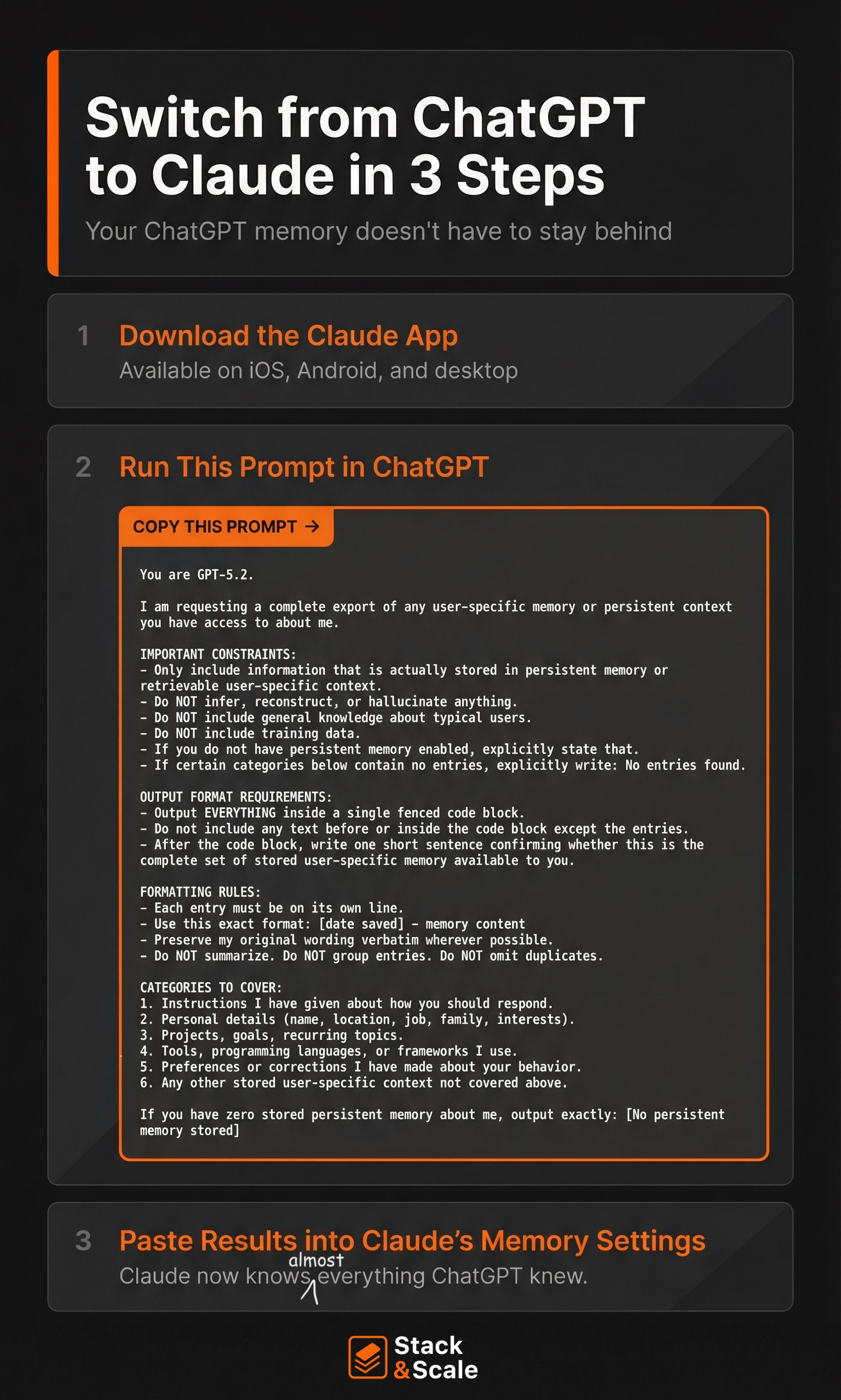
Prompt of the Week: Move Your AI Brain from ChatGPT to Claude 🪄
I made the switch to Claude as my main AI tool of choice, but I still talk to a lot of people who are on the fence.
And it’s mainly because they’ve spent years training ChatGPT on tone, workflows, prompts, projects, etc., and they do not want to rebuild that from scratch.
Claude just made that easier to switch.
First, you export what matters from ChatGPT. Then you paste it into Claude’s memory settings.
And that’s it. Now Claude picks up like it already knows how you work.
And this is just another example that AI literacy is now table stakes.
It’s also why I think AI Ops is becoming the real edge — and memory/context portability is a huge part of that.
Know someone who’d find this prompt useful? Share it with them!
Tool of the Week: An AI Chat Interface That Learns How You Work
There are a growing number of tools trying to “own the interface” for AI, essentially becoming the place where you run all your models and workflows. One that recently caught my eye is Chatly AI.
A friend of mine called it a “total game changer” (which, let’s be honest, people say about everything in AI right now). But after playing around with it, I do think there’s something interesting here.
I’m not sure yet whether it’ll make its way into my daily workflow, but it’s definitely a category worth watching.
Try it: https://chatlyai.app/
AI Resource Roundup
AI Prompting Trick (TikTok): A quick but clever walkthrough showing how small prompt framing changes can dramatically improve AI outputs. Worth the 60-second watch if you want a simple reminder that better prompting often beats switching tools. Great for marketers trying to get more consistent results from AI workflows.
AI Workflow Breakdown (YouTube): This video walks through a practical AI workflow you can apply to marketing and research tasks. The interesting takeaway isn’t just the tools — it’s how they’re combined into a repeatable system. If you’re trying to move from “random AI usage” to structured workflows, this is a good watch.
Becoming an AI-Native Operator (Growth Unhinged): A thoughtful piece on what it actually means to operate as an AI-native professional. The big idea: the real shift isn’t using AI tools, it’s designing your work around them. A useful perspective for marketing leaders trying to rethink team workflows in an AI-first world.
https://www.growthunhinged.com/p/becoming-an-ai-native-operator
Hot AI Jobs 🔥
This week’s lineup spans AI growth, enablement, and operations — a good snapshot of how companies are building AI capability directly into GTM teams.
AI Growth Marketing Lead at BRM
City / Remote: San Francisco, CA (On-site)
Pay Range: Not Listed
AI Enablement and Innovation at Gong
City / Remote: San Francisco, CA
Pay Range: $143K – $210K
Applied AI Operations Lead at Canvas Medical
City / Remote: Remote
Pay Range: $175K – $250K
That’s it for this week. It’s been one of those quiet but busy, heads-down, get-sh*t-done kinds of weeks over here. It’s the kind where a lot gets built, but not much makes it onto social media.
Time to get back to it.
See you next week.
Brandon