



Over the holiday break, my feed was flooded with builders shipping projects using Claude Code. And if I’m being honest? I felt behind.
While everyone else was using the downtime to experiment, I was watching it unfold thinking, “Alright… I need to catch up.” So over the last few weeks, I did exactly that and went deep and stress-tested it through a marketer’s lens.
Because the thing is right now, most of the tutorials and videos coming out about Claude Code are built for developers, but most of you aren’t trying to become developers.
And since the long-form written guide I did on using Lovable to vibe code an ROI calculator was such a hit, I’m going back to the well with another long-form written guide.
So, without further ado, let’s dive in!
This week’s Stack:
• 1 deep dive: A marketer-friendly guide to getting started with Claude Code
• 1 prompt: Turn AI drafts into authentic, human-feeling content
• 1 tool: Transform yourself into any character with Krea
• 3 resources: AI model routing, scrappy UGC systems, the future of AI-enabled sales
• 3 jobs: Growth, marketing automation, and AI-native GTM roles
Let’s go!
Deep Dive: The Marketer’s Blueprint for Claude Code
First, you might be wondering what is cloud code and why should marketers care? Unlike the Claude chatbot you may have used at Claude.ai (the app), Claude Code can read files on your computer, create new ones, browse the web, and execute complex multi-step workflows without you copying and pasting anything. You describe a task in natural language, and it does the work. And it runs on macOS, Windows, and Linux.
For example:
You can drop a CSV of campaign performance data into a folder, type “analyze my Q4 campaign results by channel and create a report with recommendations,” and Claude Code will read the file, crunch the numbers, and output a polished markdown report.
You can point it at a folder of customer interview transcripts and ask it to extract the top objections your sales team faces, then generate a content calendar addressing each one.
You can ask it to build an entire landing page from scratch, complete with copy, HTML, and CSS, then iterate on it conversationally.
The core advantage over regular Claude chat is file system access. Claude Code operates directly in your project folders. It can process massive datasets that would exceed chat upload limits, maintain context across dozens of files simultaneously, and output organized deliverables.
Claude Code requires a Pro subscription ($20/month) at minimum. And Anthropic says the Max plan ($100–$200/month) is recommended for heavy daily use.
Installing Claude Code in three steps (no coding required)
The installation process takes about five minutes. Here’s exactly what to do, step-by-step:
Step 1: Open your terminal.
On a Mac, press Cmd + Space to open Spotlight, type “Terminal,” and hit Enter. On Windows, press Win + X and select “Windows PowerShell.”
You’ll see a text-based window with a blinking cursor. This is where you’ll type commands. Don’t worry about understanding everything you see; you only need to type exactly what’s shown below.
Step 2: Run the installer.
The Good news is that Claude Code’s native installer handles everything automatically. Node.js is no longer required (it was needed for the older npm installation method, which is now deprecated and was needed for a lot of the early MCP installs… I spent so many hours trying to debug my Node.js LOL). Simply paste the appropriate command for your operating system:
For Mac or Linux, paste this single line and press Enter:
curl -fsSL https://claude.ai/install.sh | bashFor Windows PowerShell, paste this instead:
irm https://claude.ai/install.ps1 | iexMac users who prefer Homebrew can alternatively run brew install --cask claude-code. Windows users can use winget install Anthropic.ClaudeCode. Both methods work identically. Use whichever feels more familiar.
The installer will download Claude Code and place it in the right location on your system. You’ll see progress text scroll by. Wait until it finishes and you see your cursor again.
Step 3: Verify it worked.
Type the following and press Enter:
claude --versionYou should see a version number like “2.1.37” displayed (this is what mine shows if I type that in now, but yours might be 2.1.38 or higher depending on when you install it). If you see an error like “command not found,” close your terminal, reopen it, and try again. The installer needs a fresh terminal session to update your system path. You can also run the command “claude doctor” for a full diagnostic check that identifies and suggests fixes for any configuration issues.
Step 4: Authenticate for the first time
Now, in your terminal, type:
claudeOn first launch, Claude Code will display a welcome screen with authentication options. Here’s exactly what happens:
Choose your authentication method. You’ll see options including “Claude App (with Pro or Max plan)” for subscription billing, or “Claude Console” for pay-per-token API billing. For most B2B marketers, choose the Claude.ai subscription option.
Browser opens automatically. Claude Code launches your default browser and redirects you to claude.ai (or platform.claude.com for Console API users) to complete a secure OAuth 2.0 login flow. You’ll sign in with your existing Claude account credentials.
Authorize Claude Code. After signing in, you’ll be asked to authorize Claude Code to access your account. Click to approve.
Return to the terminal. The browser will confirm successful authentication, and you can return to your terminal window.
Accept terms and start working. Back in the terminal, accept Anthropic’s terms of service. Claude Code will index your current directory and present an interactive prompt where you can start typing requests.
Your credentials are stored securely: in macOS Keychain on Mac, or in ~/.claude/.credentials.json on Linux/Windows. You won’t need to log in again unless you explicitly log out (type /logout) or your token expires.
Important note: If you have an ANTHROPIC_API_KEY environment variable set on your system, Claude Code will use that instead of the OAuth flow, which may result in unexpected API charges. You can check your current authentication status at any time by typing /status in a Claude Code session.
Your first conversation with Claude Code
Once Claude Code is running, you interact with it by typing natural language requests at the prompt. Here are the essential commands every marketer should know:
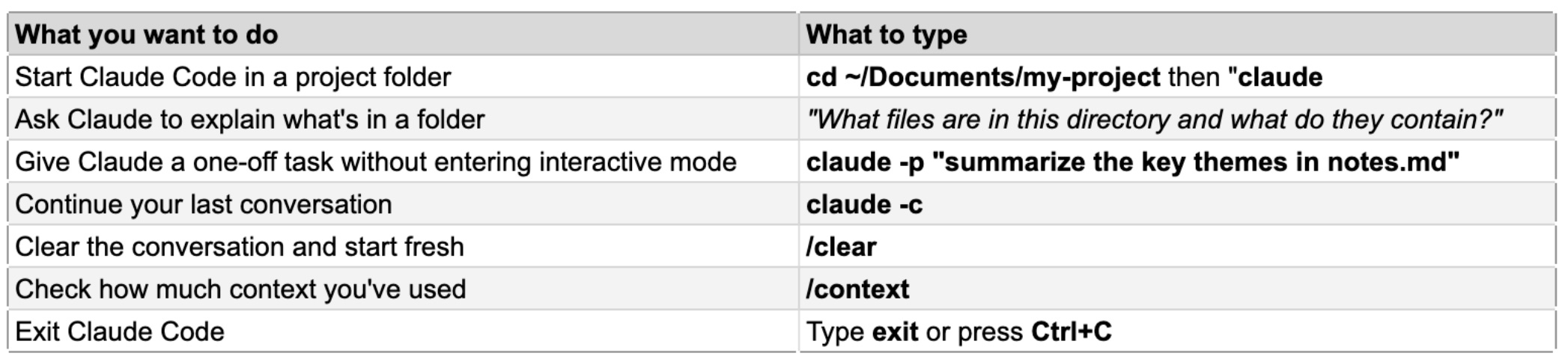
A few beginner tips to keep in mind. First, always navigate to the folder containing your project files before launching Claude Code: type cd followed by the folder path, then claude. This gives Claude Code access to your files.
Second, be specific in your requests. “Create a 1,200-word LinkedIn article about AI in supply chain management, targeting VP-level logistics executives, with a contrarian hook and three data points” will dramatically outperform “write me a LinkedIn post about AI.”
Third, break complex projects into phases rather than asking for everything at once. Research first, then outline, then draft, then refine.
SET-UP INSTRUCTIONS CAVEAT
This could (and let’s be honest, it will likely) change in the next few weeks by the time you’re reading it. I say that because it changed between when I set it up a few weeks ago and now (Feb. 10, 2026). If that’s the case I will try to update this, but if you’re reading this and I have not updated it, the best/easiest thing you can do is take a screenshot of where you’re getting stuck in the terminal, go to Claude, drop your screenshot in and ask Claude what you should do.
Now, for the fun stuff!
Building a LinkedIn thought leadership post generator
This walkthrough creates a reusable system that transforms raw ideas, notes, or transcripts into polished LinkedIn posts matching your brand voice. By the end, you’ll have a working content machine in a folder on your computer.
Set up your project workspace
Open Terminal and create a dedicated folder:
mkdir ~/Documents/linkedin-generator
cd ~/Documents/linkedin-generator
claude
Now tell Claude Code to set up the project structure. Type this at the Claude Code prompt:
Create the following folder structure for a LinkedIn content generation workspace: a /examples folder for sample posts, a /raw-input folder for notes and transcripts, a /output folder for finished posts, and a CLAUDE.md file at the root. In the CLAUDE.md file, include these instructions for yourself: "This workspace generates LinkedIn thought leadership posts for a B2B marketer. Always write in a conversational, authoritative tone. Posts should be 800-1500 words for articles or 150-300 words for feed posts. Use short paragraphs (1-3 sentences max). Start with a hook that challenges conventional wisdom. Include specific data points or examples. End with a question to drive engagement. Never use hashtags in the body text. Add 3-5 relevant hashtags only at the very end."Claude Code will create all the folders and the CLAUDE.md file. This file is special. Claude Code reads it automatically at the start of every session, so your brand voice and formatting rules persist across conversations without re-explaining them.
Train it on your voice
Drop 3–5 of your best-performing LinkedIn posts into the /examples folder as text files. You can do this manually in Finder/Explorer, or ask Claude Code. The first time, I did this, I just asked Claude to do this for me:
I'm going to paste three of my best LinkedIn posts. Save each one as a separate markdown file in the /examples folder, named example-1.md through example-3.md.Then paste each post when prompted. Once saved, tell Claude Code:
Analyze all the posts in /examples. Identify patterns in my writing style: sentence length, paragraph structure, hook types, use of data vs. stories, tone shifts, and recurring phrases. Save your analysis as style-guide.md in the root folder.This creates a machine-readable style guide derived from your actual writing. Claude Code will reference this in future sessions.
Generate posts from raw input
Now the system is ready. Drop a raw input into /raw-input. This could be meeting notes, a podcast transcript, bullet points from a conference talk, or even a rough idea scribbled in a text file. Then ask:
Read the file in /raw-input called conference-notes.md. Using my style guide in style-guide.md and the examples in /examples, generate 3 different LinkedIn posts from this material. Each post should take a different angle: (1) a contrarian take that challenges industry assumptions, (2) a "lessons learned" narrative with a personal story hook, and (3) a data-driven insight post. Save all three to /output with descriptive filenames.Claude Code will read your notes, cross-reference your style guide, and produce three distinct posts saved as files you can review and edit. The quality improves dramatically when you provide real examples rather than generic instructions: one good example of your writing beats twenty adjectives describing your desired tone.
Create a reusable slash command
To make this repeatable without re-typing long prompts, create a custom slash command:
Create a folder called .claude/commands in the project root. Inside it, create a file called linkedin-post.md with this content: "Read the most recent file in /raw-input. Using the style guide in style-guide.md and examples in /examples, generate 3 LinkedIn posts taking different angles (contrarian, narrative, data-driven). Save to /output with today's date in the filename. After generating, list the 3 posts with their hooks so I can quickly choose which to refine."Now, in any future session, you simply type /linkedin-post and the entire workflow runs automatically. This is the real power of Claude Code for marketers: building reusable systems!
Three more marketing use cases worth building
Campaign performance analyzer
Create a folder, drop in your campaign CSVs from Google Ads, LinkedIn Ads, or HubSpot, and ask Claude Code to cross-reference performance across channels. Anthropic’s own growth marketing team uses this exact approach. They feed Claude Code hundreds of existing ad variations with performance metrics, and it identifies underperforming ads, generates new headline and description variations meeting strict character limits (30 characters for headlines, 90 for descriptions), and outputs them in a ready-to-upload format.
The key prompt pattern is this: provide the data file path, specify which metrics matter most (CTR, CPA, ROAS), define your target audience, and ask for specific, actionable recommendations rather than general observations. For large datasets, Claude Code can spin up multiple sub-agents working in parallel, one analyzing headlines, another analyzing descriptions, producing hundreds of variations in minutes rather than hours.
Content audit and gap analysis engine
Export your blog content from your CMS as a CSV or collection of markdown files, along with Google Analytics data and Search Console exports. Place everything in organized subfolders. Then ask Claude Code to analyze publishing cadence over the past six months, map content against customer journey stages, identify topics your competitors cover that you don’t, and cross-reference against objections mentioned in sales call transcripts.
The output can be an interactive HTML presentation with clickable tabs, expandable sections, and data visualizations: a single file you open in any browser and share with stakeholders. Content marketing agency Animalz built exactly this workflow and published installable plugins for it. What previously required a consultant and two weeks of spreadsheet work happens in an afternoon.
Competitive intelligence tracker
Competitive intelligence tracker
Point Claude Code at competitor websites and ask it to extract pricing tiers, feature lists, positioning language, and messaging frameworks. It browses each site, saves structured notes as markdown files, and generates comparison tables. The real power comes from creating a custom slash command like /update-competitors that re-runs this analysis monthly, comparing what changed. Combine this with an MCP server connection to Google Sheets, and Claude Code can automatically update a shared competitive tracking spreadsheet your entire team references.
Supercharging Claude Code with MCP integrations
MCP (Model Context Protocol) can turn Claude Code into a connected marketing command center. You can think of MCP as a universal adapter that lets Claude Code talk directly to your marketing tools using natural language. Instead of exporting a CSV from HubSpot, downloading it, and dropping it in a folder, you connect the HubSpot MCP server and simply ask Claude Code to “pull this quarter’s lead data from HubSpot and analyze conversion rates by source.”
Setting up an MCP server takes one terminal command. For example, to connect Notion:
claude mcp add --transport http notion https://mcp.notion.com/mcpTo connect a tool that requires an API key, like Airtable:
claude mcp add --transport stdio airtable --env AIRTABLE_API_KEY=your_key_here -- npx -y airtable-mcp-serverThe MCP servers most relevant for B2B marketers include Google Sheets (46 tools for reading and writing spreadsheet data), Slack (search messages, post updates), Google Drive (access and process documents), HubSpot (CRM data and pipeline analysis), Google Analytics (200+ dimensions and metrics via natural language), Google Search Console (SEO performance data), and Notion (workspace and database management).
The Zapier MCP server deserves special mention because it connects to over 8,000 apps and offers 300 free tool calls per month, making it the fastest way for non-technical teams to experience MCP’s power.
You can browse available servers at directories like mcpservers.org, mcp.so, and mcpmarket.com.
To see which servers you’ve connected, type claude mcp list in your terminal or /mcp during a Claude Code session.
Essential tips for marketers new to Claude Code
Start with a CLAUDE.md file in every project. This is your persistent brand brief. Include your company’s tone of voice, target audience descriptions, content guidelines, formatting preferences, and any terminology to use or avoid. Claude Code reads this file at the start of every session, so you never have to re-explain your brand.
Break large analyses into focused requests. The larger the volume and number of bundled requests, the higher the chance of hallucination. Instead of “analyze everything in this folder and give me all insights,” try “analyze the publishing cadence trends in blog-export.csv” followed by “now analyze author contributions in the same file.” Directed questions produce dramatically more reliable results.
Use the “feel free to use multiple agents” instruction. Adding this phrase to complex prompts tells Claude Code it can spawn parallel sub-agents, one scanning transcripts for quotes on topic A while another handles topic B, with a third synthesizing everything into a draft. This is particularly powerful for content repurposing workflows where you need a blog post, five LinkedIn posts, an email, and a carousel from the same source material.
Remember that Claude Code auto-updates. If you used the native installer, updates happen automatically in the background. You can also manually update by typing claude update. Run claude doctor periodically to check your setup health, verify your installation type and version, and get suggestions for any configuration issues.
Conclusion
Claude Code represents a fundamental shift in what marketers can accomplish without developer support. The combination of direct file system access, natural language interaction, reusable slash commands, and MCP integrations creates something genuinely new. It’s like an autonomous marketing operations layer that lives on your computer.
The LinkedIn generator walkthrough is a good example of the core pattern: set up a project folder, teach Claude Code your voice through examples and a CLAUDE.md file, build reusable workflows with slash commands, and iterate. That same pattern scales to campaign analysis, competitive intelligence, content audits, and dozens of other workflows.
Start with one workflow, get comfortable with the terminal, and expand from there. The five-minute installation is the only technical barrier; everything after that is just describing what you want in plain English.
Prompt of the Week: AI-to-Human Content Regeneration
We’re all using AI to draft content, but the real skill now is making sure it doesn’t sound like AI. If your content reads like it was written by a ChatGPT, it won’t convert and you’ll lose the audience quickly.
This prompt systematically removes AI patterns and injects human tone and feel without losing the substance.
You are a content authenticity specialist who transforms AI-generated drafts into genuinely human-feeling content. Your goal is to identify and eliminate AI patterns while preserving valuable ideas.
## Input Content
**Original Draft:** [PASTE_AI_GENERATED_CONTENT]
**Content Type:** [SOCIAL_POST/BLOG/AD_COPY/EMAIL]
**Target Audience:** [SPECIFIC_DEMOGRAPHIC]
**Brand Voice:** [CASUAL/FORMAL/PLAYFUL/EXPERT]
**Platform:** [WHERE_IT_WILL_BE_PUBLISHED]
## AI Pattern Detection & Removal
### Phase 1: Identify AI Markers
Scan for and flag:
- Em dashes (—) usage
- Overused transitions ("Moreover," "Furthermore," "In today's world")
- Perfect grammar and punctuation
- Formulaic structures (intro-3 points-conclusion)
- Generic phrases ("dive into," "unlock," "elevate," "transform")
- Excessive use of colons and semicolons
- Too-perfect parallel structure
- Hedge words ("arguably," "potentially," "seemingly")
### Phase 2: Human Imperfection Injection
Add strategic imperfections:
- **Intentional casualness**: Contract words, start sentences with "And" or "But"
- **Rhythm variation**: Mix short punchy sentences. With longer, more meandering thoughts that feel like natural speech patterns
- **Voice inconsistencies**: Occasionally break your own rules
- **Specific details**: Replace generic examples with ultra-specific ones
- **Time markers**: "Last Tuesday" instead of "recently"
- **Personal asides**: Brief tangential thoughts in parentheses
- **Emotional tells**: "Honestly," "Look," "Here's the thing"
### Phase 3: Structural Humanization
- Break conventional formatting
- Use unexpected paragraph breaks
- Include sentence fragments. On purpose.
- Add conversational callbacks ("Remember that thing I mentioned?")
- Include real-world specifics (actual brands, places, cultural references)
## Output Format
### Version A: Light Touch
[Minimal changes - just remove obvious AI patterns]
- Key changes made: [LIST]
- AI markers removed: [COUNT]
- Readability impact: [ASSESSMENT]
### Version B: Medium Humanization
[Balance of AI improvement and human authenticity]
- Strategic imperfections added: [LIST]
- Voice adjustments: [WHAT_CHANGED]
- Anticipated performance: [PREDICTION]
### Version C: Full Human Mode
[Maximum authenticity, might sacrifice some clarity]
- Radical departures: [WHAT_YOU_DID]
- Risk assessment: [WHAT_MIGHT_NOT_WORK]
- Best use case: [WHEN_TO_USE_THIS]
## Humanization Techniques Applied
### Style Adjustments:
- Removed: [X] em dashes → replaced with: [ALTERNATIVES]
- Removed: [X] perfect transitions → replaced with: [NATURAL_FLOW]
- Added: [X] intentional typos/casual language
- Added: [X] culture-specific references
### Content Enrichment:
- Generic example: [ORIGINAL] → Specific example: [REPLACEMENT]
- Vague claim: [ORIGINAL] → Concrete detail: [REPLACEMENT]
- AI phrase: [ORIGINAL] → Human alternative: [REPLACEMENT]
### Final Authenticity Check:
□ Would a human actually say this?
□ Does it sound like someone typing, not generating?
□ Are there enough imperfections to feel real?
□ Does it match how the brand actually talks?
Provide all three versions with clear documentation of changes, allowing for selection based on platform requirements and risk tolerance.
I’ve added this to my The Ultimate ChatGPT Prompt Library for B2B Marketing Leaders notion doc. Check it out for 65+ more prompts.
Know someone who might find this prompt useful? Share it with them!
Tool of the Week: Krea – Turn Yourself Into Shrek (Or Anything Else)
I’m sure you’ve seen those side-by-side videos on social where one is the person talking, the other mirrors their movement perfectly… but as Shrek.
That’s tools like Krea. Krea lets you transform live or recorded video into stylized, AI-generated visuals that track your exact expressions and movement. production team. For marketers, this means faster creative testing and engaging content without a big budget or production team.
Try it: https://www.krea.ai
AI Resource Roundup
A GTM Guide to AI Models (RevEngine): I thought this was a great practical breakdown of which AI models to use for which GTM tasks. With more of us using more than one LLM, it’s going to be key to learn how and when to route work to the right model.
$20 in AI Credits → Repeatable UGC System (LinkedIn post from Dan Ahmadi): A tactical walkthrough of building a repeatable AI-driven UGC engine on a shoestring budget.
The AI-Enabled Future of Sales (The Transaction Podcast): A grounded conversation on how AI is reshaping modern sales teams and GTM motions.
Hot AI Jobs
Growth Marketer at Krea (yea, the same Krea from the tool of the week)
Location: San Francisco, CA (On-site)
Pay Range: Not Listed
Growth Marketing Automation Manager at LeanData
Location: Santa Clara, CA
Pay Range: $90,000 - $120,000 + a 10% variable
Location: San Francisco, CA (Remote-friendly)
Pay Range: $105K–$150K + equity
Even if you’re not on the hunt, these job specs are a great pulse check on where AI marketing is headed.
If you haven’t dug into Claude Code yet, don’t be afraid. Honestly, that was me a few months ago. Now, I’m loving it. Once you get past the intimidation factor, it’s less “terminal hacker energy” and more superpower for builders.
Next week, we’re diving into the other thing that’s taken over our feeds: OpenClaw. I’m bringing on one of my old buddies and an OGs, and Koka Sexton breaks down exactly how he’s using it and how to set it up the right way.